Free, open source, for Linux
Scour Instant file search for Linux.
Scour keeps the machine’s files and folders in an index of its own and answers
searches from it: on this machine 4,842,854
entries, a one-word search in 7.9 ms. That is
the difference from find, which walks the disk
every time. No account, no cloud, no network request; written in Rust, licensed
MIT/Apache-2.0.
Measured
Measurements
None of them is a target; every one was taken from a running installation. The method and the raw figures are in the repository, in MEASUREMENTS.md.
- 4,842,854
- files and folders indexed
- a home directory, a second NTFS volume and the system
- 7.9 ms
- a one-word search
- socket, parse, search, sort, count and forty rows included
- 493 MB
- the index on disk
- memory-mapped — the kernel can reclaim it under pressure
- 0.8%
- of one core while idle
- two volumes watched live, nobody looking
Four faces
Four interfaces, one index
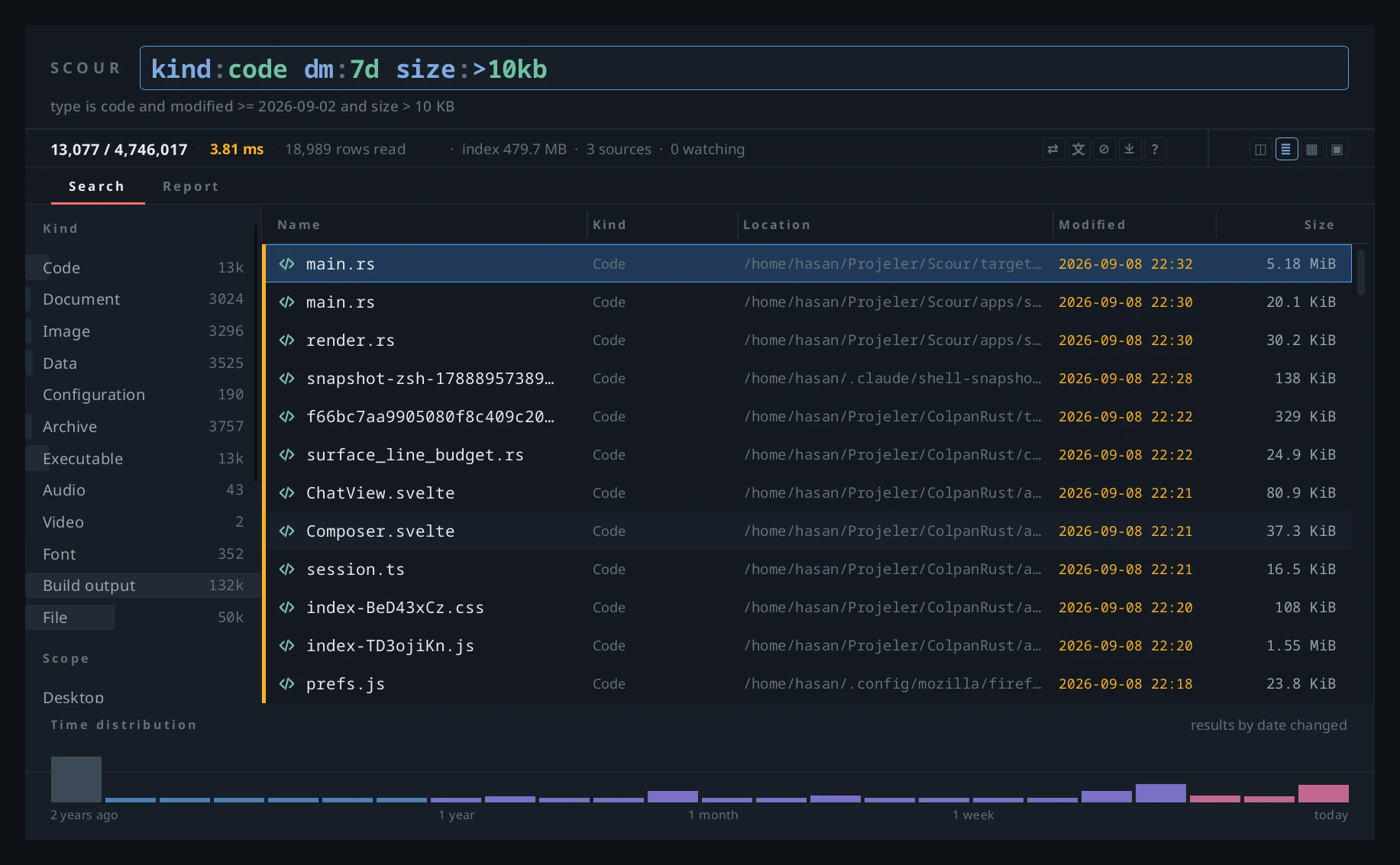
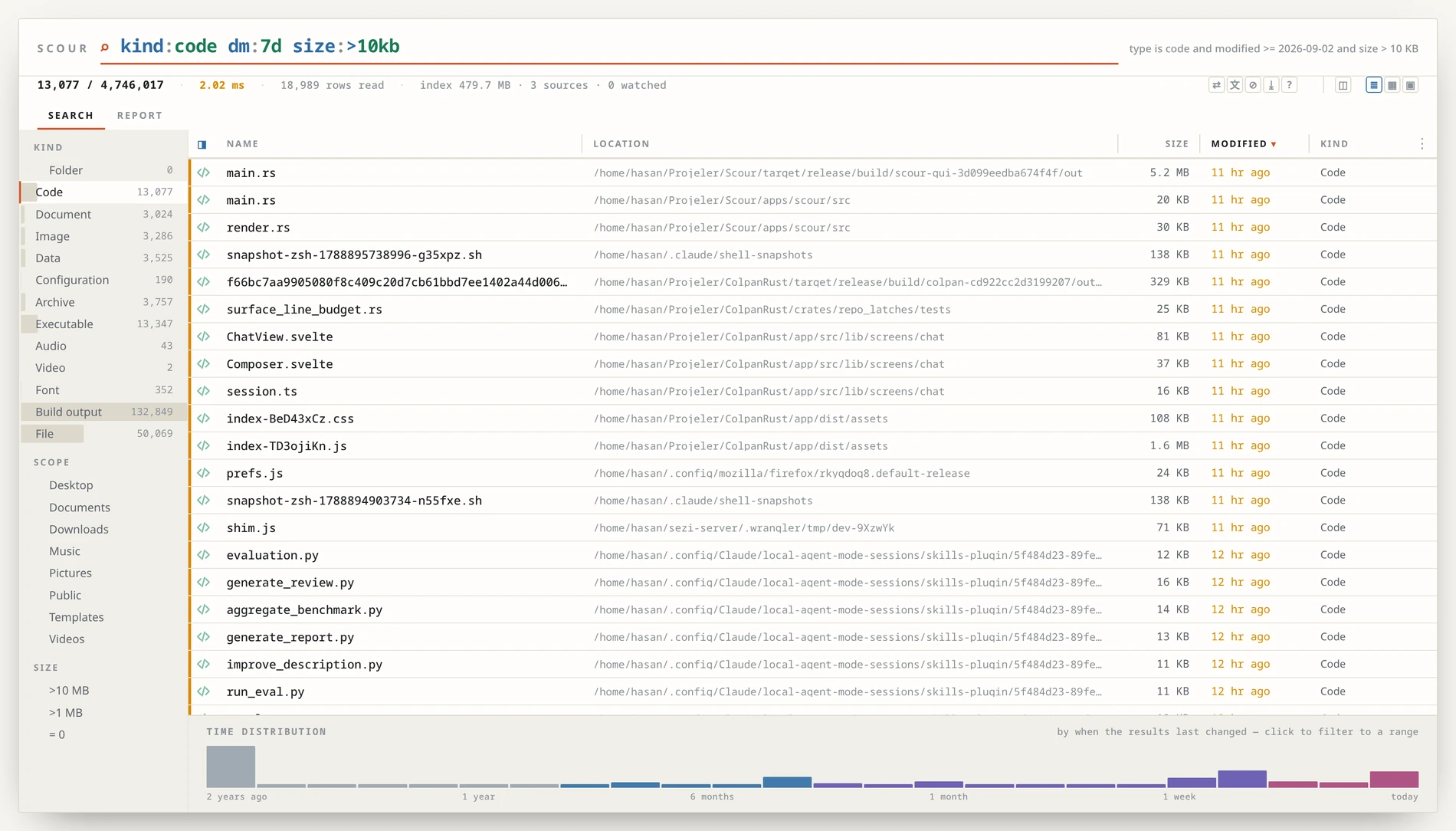
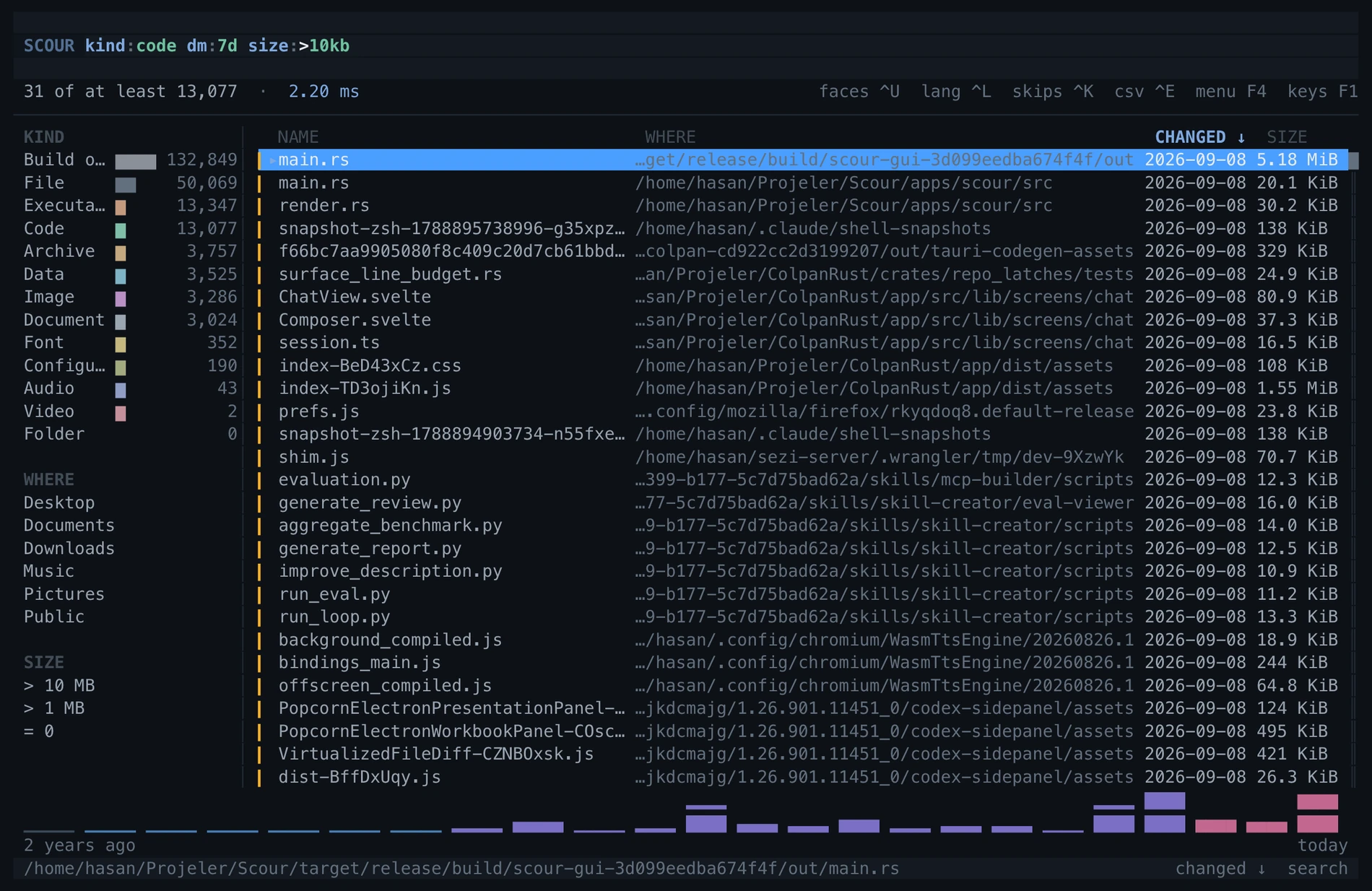
The three pictures below were taken at the same moment, on the same machine,
from the same query: kind:code dm:7d size:>10kb.
The only difference is what you are looking at. The fourth face, the one-line
scour command, is what scripts use — and its
form for language models, scour-mcp: eleven
read-only tools, every answer bounded; scour mcp-config --for codex
says what to paste where.
Window
The desktop’s own application
A native window in Rust and Slint. The CPU draws it — measured, and a GPU wins nothing on a list of text while costing 24 MB more memory. Twelve columns to pick from and drag; a name that was cut says the whole of itself on hover; the preview opens beside the list. Put it on a key, and the second press brings the same window forward.
Browser
A local bridge, not a remote server
It opens a port on your own machine and serves the page from there. The same columns, the grid view, CSV export, duplicate finding and the report tab live here. The link carries a token, the token changes every run, and no port faces outward.
Terminal
ratatui, and the far end of an ssh session
The same index, full-screen in a terminal. Wherever a window cannot open — a remote machine, a rescue shell, a server — the search is there at the same speed. And a plain scour command answers in one line.
Query language
Query language
A space is AND, | is OR, !
is NOT; quotes make a phrase, * and
? are wildcards, field:value
narrows. One word on its own is enough. Field names can be written in Turkish
too. An unknown field is not an error — it is searched for as text — and
scour explain says how a query was read.
report- anything with that in its name
ext:pdf size:>1mb- PDFs over a megabyte
kind:image dm:7d- pictures changed this week
*.slint | *.rs- either of the two
!target ext:toml- TOML files with no
targetin the name user:root perm:/222- owned by root, writable by anyone
The whole list: scour syntax — or
the query language page in the docs.
How it keeps up
Watching the filesystem
The index is updated as the filesystem changes. Linux offers two ways to hear about that; Scour uses fanotify only. The reason and the cost follow.
inotify — and why not
It wants one watch per directory. This machine has 609,322 of them; the kernel hands out 524,288 per session. So this machine cannot be watched with inotify at all — not even if Scour swallowed the entire budget by itself.
And that budget is shared: your editor, your IDE, your file manager and every
npm run dev draw from the same pool. When one
program exhausts it the failure does not appear in that program — it
appears in the next one to start, and it never says “out of watches”. Each
watch holds about a kilobyte of unswappable kernel memory.
fanotify
It marks the filesystem itself rather than the directories in it. This machine has two volumes, so: two marks. The number of folders does not enter into it — a million folders is still two marks. Measured cost while idle, with both volumes watched: 0.16% of one core.
Root is needed once
Listening to a whole filesystem means, by definition, seeing things outside
your own files, and the kernel puts that behind
CAP_SYS_ADMIN — a reasonable place for it. But
Scour does not hold that privilege. It borrows it for a moment and
gives it back.
scour-watch is a separate program that depends
on no part of Scour and does only this: it opens the fanotify descriptor,
places the marks, resolves them, drops the privilege and execs
the service. The handover was measured rather than assumed — the process that
comes out reports CapEff=0, and both attempts to
escalate return EPERM. It installs nothing: no
setcap, no persistent mount.
The thing people reach for instead — a passwordless
sudo rule — is worse here: every binary
in the chain lives under the user’s home, so a passwordless rule pointing at one
of them is passwordless root for anything that can write that directory.
And it is optional. Without it Scour still works — but it does not fall back to inotify; that road is deliberately gone. When a volume’s write counter moves it reconciles by walking: nothing is missed, changes take a little longer to appear. Network and FUSE mounts have no counter and need the mark.
Install
Install
The install script never asks for one. Seven binaries go to
~/.local/bin, a menu entry and an icon to
~/.local/share; on GNOME and KDE it puts the
window on Super+F. Deleting those files undoes it.
Commands
tar xzf scour-0.2.0-alpha.1-linux-x86_64.tar.gz
cd scour-0.2.0-alpha.1-linux-x86_64
./install.sh
Where it runs. The binaries are built against glibc 2.39: Ubuntu 24.04 and newer, Debian 13+, Fedora 40+, and any rolling distribution. Ubuntu 22.04 and Debian 12 carry an older glibc; there it builds from source, which takes about a minute.
Tested on Ubuntu 24.04 and Fedora — not “compiles for”, but run. In clean containers, as a stranger would: the installer ran, all seven binaries reported their version, the service indexed the home directory, the command line searched, the terminal face drew, the browser face served its page, and the window opened on a virtual display.
Limits
Linux only, in practice. The Windows build was started once on one machine for an afternoon and that is all — untested; the zip is on the release page for whoever wants to try it. macOS compiles and has never been run; compiling is not running.
Version 0.2.0-alpha.1. Alpha: daily use on one machine, measured against 4.8 million entries; the index format may change. Report problems on GitHub.