Introduction
What Deste is, the idea behind virtual-printer capture, its standout capabilities, and a map of how this documentation is organized.
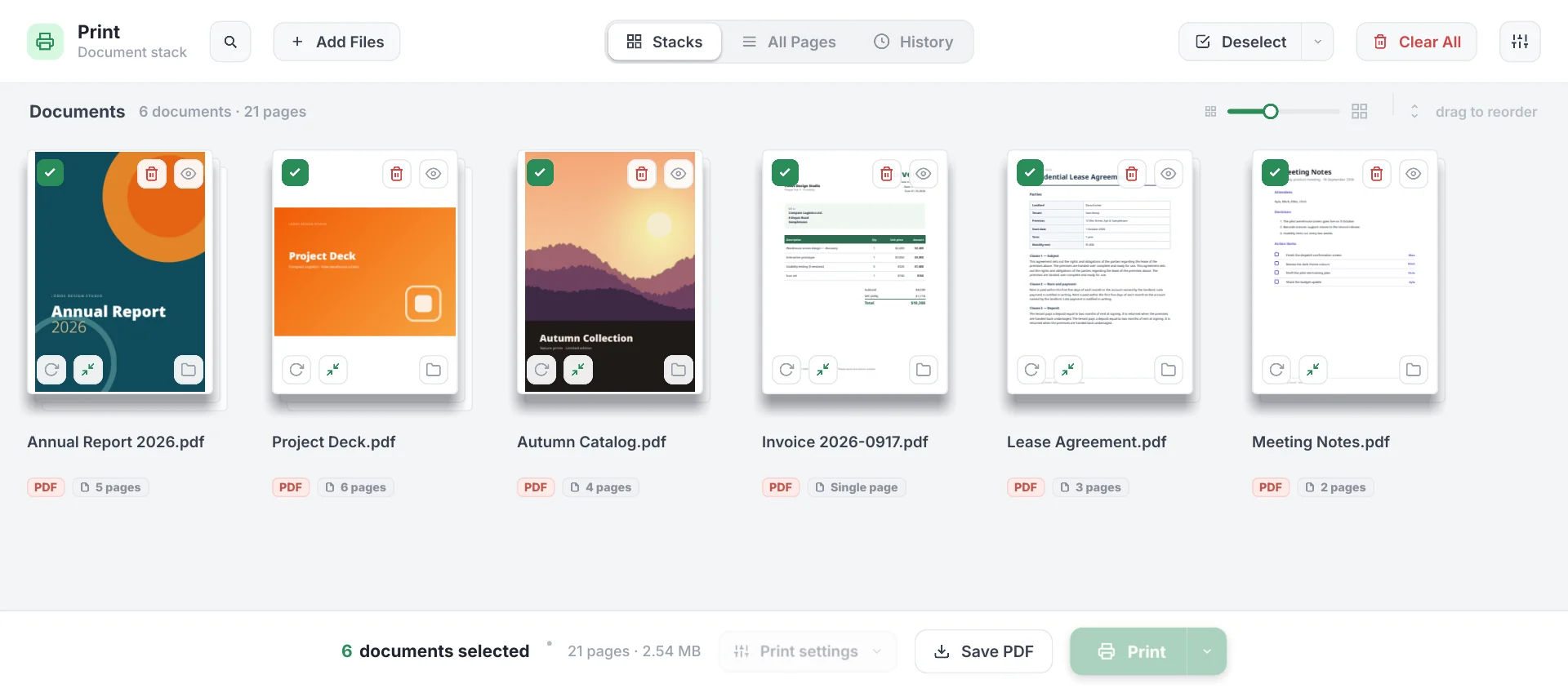
Deste is a batch printing and print-preview application for Windows, built by ReviseTouch. It adds itself to your system as a virtual printer: when you choose Deste from any app’s “Print” dialog, the print job is captured instead of going to paper, and it lands in the panel as a stack of documents (which is exactly what the name means in Turkish). There you select, reorder, drop the pages you don’t want, rotate, decide how it should print, and then send everything to your real printer in one pass — or save it all as a single PDF. It’s a native Rust application drawn with Slint, with previews rendered by pdfium.
What Deste is
Deste is a free and open-source (MIT-licensed) printing tool. Its English name is Print Stack. It runs from a single deste.exe plus its pdfium.dll, sits in the system tray, and runs a small local capture server in the background.
Unlike the built-in print dialog, Deste catches your print before the last moment: your document is collected on screen before it ever becomes ink or toner. So you see it before printing, drop the pages you don’t need, merge several documents, and genuinely cut paper and toner waste.
How it works
Deste registers with Windows as a local IPP printer and listens on localhost. The flow is:
- In any app (Word, a browser, a PDF reader — it doesn’t matter) you pick Print → Deste.
- Windows sends the print job over HTTP to Deste’s capture server; the job is saved as a PDF in a writable folder on your computer.
- The Deste window shows the new document at the top of the stack instantly, generating thumbnails with pdfium.
- You organize the documents (select / reorder / drop pages / rotate), set copies · duplex · eco · black-and-white, and press Print.
- Deste sends the pages to your real printer (directly, preserving text and vectors, when no filter is active; as an image when black-and-white or eco is selected), or it saves the selection as a single PDF.
This entire journey happens on your machine, over localhost — nothing goes to the internet.
Philosophy
A few core principles shape how Deste works:
- See it before you print. Every print lands in a preview stack before reaching paper. You decide there which documents, which pages, and how many copies actually print.
- Respect paper and toner. Dropping pages, merging several documents into one job, double-sided (duplex), and eco mode all exist to reduce waste. If the copy count is greater than one, an explicit confirmation appears to guard against waste.
- Fully local and private. The capture server only listens on
localhost; your documents never leave your machine. No network, no account, no cloud. - Native and lightweight. Deste is a native Rust application with a software-rendered Slint interface. Previews and print output are produced with pdfium.
- Open source. All source code is available under the MIT license; you can read it, build it, and contribute.
Standout capabilities
| Capability | What it does |
|---|---|
| Virtual-printer capture | Print to Deste from any app; the job is captured as a PDF and dropped onto the stack. |
| Document stacks | Each captured document becomes a card with its cover and page count; you reorder them by dragging. |
| All-pages view | See every page of every document in one grid; drop or rotate individual pages. |
| Large preview (overlay) | Click a page to open a full-size preview; navigate, rotate, drop. |
| Drop pages and reorder | Remove unwanted pages from the print, and reorder documents and pages with drag-and-drop. |
| Copies · Duplex · Eco | Copy count, long/short-edge duplex, three-level toner saving, and black-and-white. |
| Vector printing | When no filter is active, pages print directly with text and vectors preserved (Word/Adobe-grade sharpness). |
| Save as PDF | Merge the selected pages, in view order, into a single PDF. |
| PDF compression | Shrink a PDF while keeping text searchable; Smart or Aggressive, per-page strength. |
| History & re-queue | Deleted or cleared documents are archived; preview and restore them anytime. |
| Windows print dialog | Optionally hand printer/paper/copy selection to the system’s standard dialog. |
| Tray and auto-start | Runs in the system tray; can start silently at sign-in via the registry. |
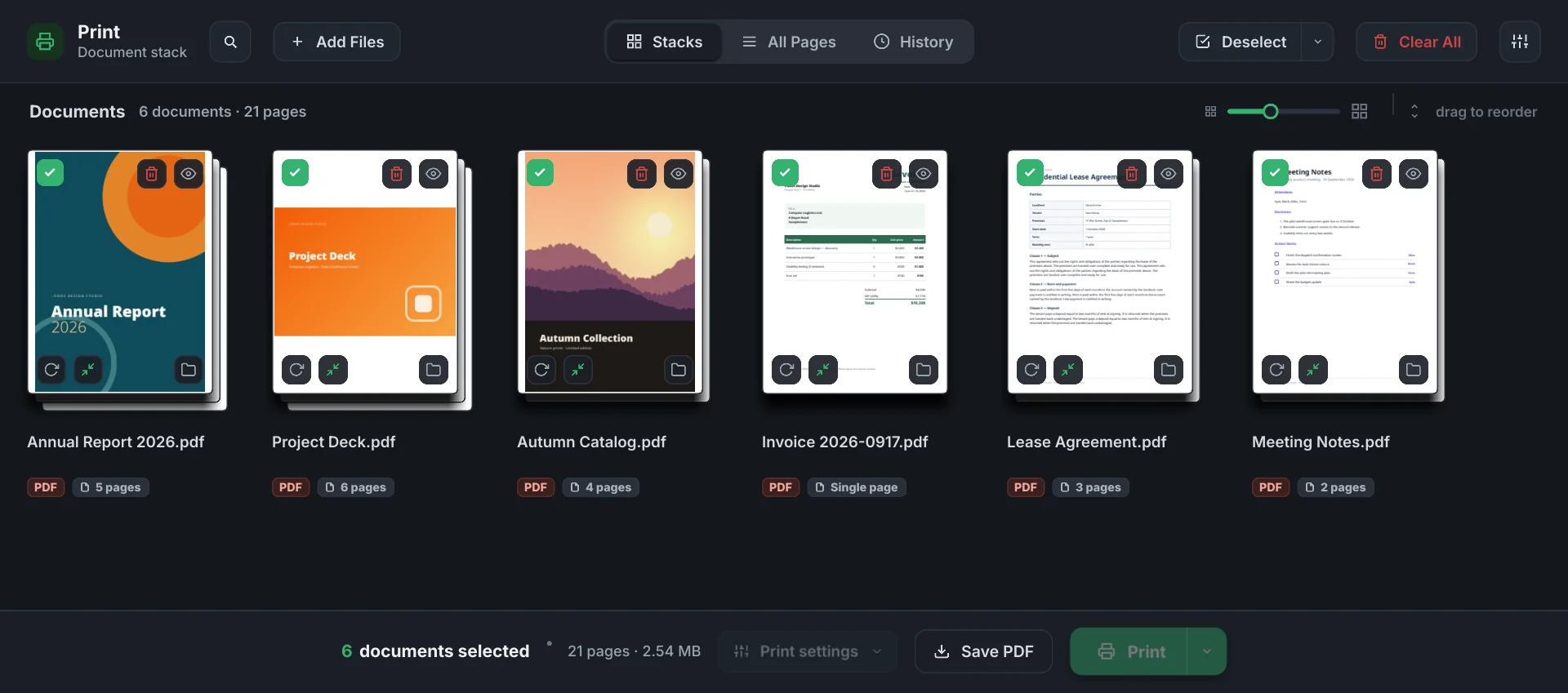
| Light / dark friendly UI | A token-based, clean, readable design; flip the interface to dark colors with the Dark mode toggle in Settings. |
Who it’s for
Deste is for anyone who prints a lot and cares about paper and toner waste:
- Office users who want to print several documents at once, neatly and double-sided.
- Students and teachers who want to drop unwanted pages (covers, ads, blank pages) before printing and save toner.
- Anyone who wants to merge output from different apps into a single PDF.
- Privacy-minded users who want their documents to stay on their machine.
Platform
Deste runs on Windows 10 and 11. Because capture (IPP), printing (GDI/pdfium), and the tray use Windows-specific APIs, it is Windows-only today.
How this documentation is organized
The docs are grouped so you can get going quickly and dig deeper as you go.
Getting Started
- Installation — download
deste.exeand add it to Windows as a printer. - Quick start — your first capture and print in a minute.
- FAQ — short answers to common questions.
Features
- Capturing prints — how the virtual printer works and where captures go.
- Organizing documents — stacks and all-pages view, selection, reordering, dropping pages, rotation.
- Print options — copies, duplex, eco, black-and-white, and the vector/raster path.
- Saving as PDF — merging selected pages into a single PDF.
- Compressing PDFs — Smart vs. Aggressive, per-page strength, before/after.
- History and re-queue — archive of deleted/cleared documents, preview and restore.
Reference
- Settings — dark mode, run at startup, auto-cleaning captured files, and the tray.
- Troubleshooting — printer not showing, port in use, and the print loop.
- Privacy — what stays local and why nothing goes to the network.
Built by ReviseTouch
Deste is a free, open-source application from ReviseTouch, where we build developer tools.
Next steps
- Installation — get Deste up and running.
- Quick start — capture and print your first document.
- Print options — learn duplex and eco mode.